Showing posts with label smartphones. Show all posts

Sunday, 16 October 2016

49 best free websites and apps to learn something new

Once upon a time, if you wanted to learn something, you had to a) pay a bunch of money, and b) go to a school or classroom, a place specifically dedicated to learning. Those days are over.
Now, a profusion of apps, websites and institutions offer us a wider variety of (often superior) educational experiences than ever before- and we can access them from anywhere in the world, often for free. The apps and websites on this list can teach you practically anything- from coding and cooking, to surfing and negotiating.
In this day and age, there is simply no excuse to not know something you’d like to know. You can learn anything, for free, at your own pace, anywhere you can access the internet. We’re out of excuses not to educate ourselves- short of downloading knowledge directly into your head, this is as easy as it gets.
This time, I am going to share inspiring apps, websites and tools that you can use to ease your life and take full advantage of without paying a single penny. The era in which we are living is completely digital and full of knowledge that we must keep on learning in order to move forward. So take a look at the list below and don’t forget to share if you find it valuable J
Take free online courses on a variety of subjects
Khan Academy- High-quality free courses on a variety of subjects
Alison- Free online courses from the world’s top publishers.
CourseBuffet- Free online courses created by universities.
Edx.org – Free/Paid online courses from World top universities (Harvard, MIT, UCBerkeley, Dartmouth, Cornell, Columbia etc)
Udemy- Huge selection of free and premium courses- mostly on technical skills.
Highbrow- Free 10-day courses, divided into 5-minute daily lessons and delivered by email.
Academic Earth- Free online academic education for everyone.
Learnist- Print and video content, crowd sourced and curated by experts.
Degreed- Unlimited learning. Free forever.
Get healthier, be more productive, and learn faster
Memrise- Learn a variety of subjects via digital flashcards and crowd sourced mnemonics.
Greatist- Articles on becoming healthy and happy.
ZenHabits- Minimalist productivity advice, with a focus on psychology.
Anki- Free flashcard software.
Hello Healthy- Short, actionable health weight loss and fitness articles.
Fitocracy- Free workout, fitness tips and fitness tracking.
Learn coding and other technical skills
Codecademy- Learn Javascript, HTML, CSS, Python and more.
Free Code Camp- Learn to code, meet other coders, build projects that help non-profits.
Code.org- Introductory coding lessons, designed for k-12 students.
Data Camp- Free and freemium courses on R, Python and data visualisation.
CodeCombat- Introductory coding lessons, in the form of a fantasy RPG.
Lrn- Phone app with free interactive coding mini-quizzes.
Learn a new language
Duolingo — Learn over 20 different languages, including Klingon for some reason.
Babbel- Free language learning with integrated speech recognition.
Drops- Study a language on your phone for just 5 minutes a day.
Busuu- Community-base language learning. Interact with native speakers.
CoffeeStrap- Practice a new language by voice chatting with native speakers with whom you share common interests.
Lingvist- Learn a language in 200 hours.
Sharpen your social and career skills
Improve Your Social Skills- Free social skills guide from a guy who overcame Asperger’s.
Succeed Socially- Free social skills guide for awkward people.
Job-Hunt.org- Free articles on job hunting, getting promoted, freelancing, personal branding, and other career skills.
Mind Tools- Free tools and videos for improving career, management and communications skills.
Make something
Makezine- Online magazine for makers with guides, projects and news.
Snapguide- Free user-created guides for makers.
ChefSteps- Mix of free and premium cooking classes.
Instructables- User-created guides for making everything from cookies to buildings.
Allrecipes- The web’s largest collection of recipes.
Become a human encyclopedia
InstaNerd- Read a never-ending series of random factoids.
TED-Ed- Curated, high-quality educational videos.
Brain Pump- Watch a random educational video.
Now I Know- Fun facts delivered in a daily email newsletter.
Curiosity- 5 fun new facts, delivered to your phone every day.
Zidbits- Huge collection of articles on fun and unusual (mostly scientific) topics.
Big Think- In-depth videos by experts.
Curious- Sharpen your brain with daily “workouts”
Do something fun
Yousician- Learn your favorite guitar, bass, piano and ukelele songs.
Parkour & Freerunning World- Free Parkour and Freerunning video tutorials. Be careful!
Chesscademy- Learn chess from the masters, and solve chess puzzles.
Pianu- Learn to play piano online.
Surfedukators- Free surfing videos, tips and tutorials
Flowkey- Free piano training app.

Source:- medium.com

Sunday, 28 December 2014

Snapdragon 805 vs 801 vs 800 - Qualcomm’s processors


Snapdragon CPUs explained

In a nutshell: The Snapdragon 805 has started to appear in a number of phones. The Samsung Galaxy Note 4 packs Qualcomm's flagship processor as does Google's Nexus 6. Interestingly the 805 is still a 32-bit chip which means it won't be able to take full advantage of 64-bit ready Android 5.0 Lollipop.

Here are the basics of this article: The Snapdragon 800 and 801 are essentially the same processor. The 801 is slightly faster in both CPU and GPU and has a better Image Signal Processor (ISP), which helps phone cameras perform better.

The Snapdragon 805 is more of a step up. It is faster than the 801 and has been designed with 4K at the forefront so will be able to support 4K resolution displays on-device, as well as 55-megapixel cameras.


Snapdragon 805 vs 801 vs 800: Introduction

There used to be a very clear naming convention identifying Qualcomm’s Snapdragon system on chip (SoC) processors. It was all about the numbers. The Snapdragon 200 sits at the low end, which can be found in the HTC Desire 500. One step up is the Snapdragon 400, used in the Samsung Galaxy S4 Mini. And the former flagship was the Snapdragon 600, used in the HTC One. We're now in the 800-series generation.
But Qualcomm's new way of naming its processors is a little confusing. This year we see 800, 801 and 805-powered phones. “We’ve decided to increment each of the new processors numerically within those tiers… The 800 and 801 are essentially the same (Krait 400) processors with speed bumps across the board” explains Mark Shedd, Director of Marketing at Qualcomm.

The first is that the Snapdragon 801 is used by all of this year's most important phones. That means the HTC One M8, The Samsung Galaxy S5 and the Sony Xperia Z2. They all use the same Snapdraon 801 processor. Well, virtually the same processor. Just to add another factor into the mix-up, Samsung announced the S5 will come with a 2.5GHz processor while the Xperia Z2 was announced at 2.3GHz.

800 vs 801 vs 805: Specs Comparison

Looking at the specs like-for-like, the 801 isn’t too different from the 800. They both use Krait 400 CPU cores and Adreno 330 GPUs, LTE Cat 4 and the same WLAN chips. There are two versions of the 801 that will be shipped in the next gen of flagships. The 8974-AC is clocked slightly higher than the 8974-AB, hence the disparity in the figures quoted by Samsung and Sony. 


More power is good, but that doesn’t necessarily mean the Galaxy S5 will feel any quicker than the Sony Z2 or HTC M8. Certain benchmarks will show the S5 to be the faster phone, however real world use may show that difference is indistinguishable. Indeed other factors, such as Android interface layers, may make more of an impact than clock speeds.

There are slightly larger clock speed differences between the 801 and 800. The 8974-AB that powers the Xperia Z2 can be clocked up to 2.36 GHz, 4.4 per cent faster than the maximum 2.26GHz of the Snapdragon 800. The 8974-AC on the S5, on the other hand, is clocked at 2.45GHz. That is 8.4 per cent faster than the Snapdragon 800 or almost 15 per cent faster than the slowest 800 variant, which runs at 2.15GHz. 

A faster, as-efficient processor is always preferable but these increases are relatively small. Of more interest is the big bump in the Adreno 330 GPU clock speed. It goes from 450MHz to 578MHz – an increase of almost 30 per cent – in the leap from Snapdragon 800 to 801. And the DDR RAM bandwidth increases by almost 17 per cent. 

We see even bigger improvements with the Snapdragon 805, which will be available this summer. It uses more efficient Krait 450 cores, which clock up to  2.7GHz and a brand new Adreno 420 GPU that Qualcomm claims is 40 per cent faster than the 330. Based on this figure we may be able to assume a clock speed of more than 700MHz. However, perhaps the biggest change is the 805’s doubling of memory bandwidth to (up to) 30GB/s a second. 


800 vs 801 vs 805: CPU Comparison

A bump in CPU performance benefits intensive tasks like opening your phone’s photo gallery, not just obvious things like gaming. You might notice that it takes longer and longer for your gallery to open the more photos you have saved with a lower-end phone. 

A fast CPU helps make opening apps, rendering large web pages or opening email attachments that much quicker. Qualcomm's Mark Shedd says the main difference will be noticeable when users “transition between activities and starting new processes. We’re seeing upgrades (to performance) of 15 per cent from the 800 to the 805”. 

The truth is that most of the apps you use on your phone or tablet don’t tax your CPU that much, which means an 8 per cent or 15 per cent increase won’t radically alter the experience other than shaving precious time from those CPU-intensive processes. 

800 vs 801 vs 805: Graphics comparison

A faster GPU means better graphics rendering, of course. Qualcomm claims the 801 is comparable to the PS3 in this respect. "You’ll be able to render the same PS3 game on a Full HD mobile phone,” says Whealton. There aren’t any Android games that are really comparable to a previous-gen console title but that the device has the power to run them means that developers can become more ambitious with their projects.

A faster GPU is also key in enabling devices with the 805 chip to support 4K native resolutions, as well as improving game loading speeds. 

The main difference between the 805 and the 800/801 is that it was built for 4K. Qualcomm explains “the 805 was designed with 4K in mind. It was plumbed all the way through to support 4K including the thermal hit”. The improved thermal management has also led to better energy efficiency, quite how much that will impact the battery life of phones and tablets remains to be seen.  

800 vs 801 vs 805: Camera and image processing comparison

The ISP (Image Signal Processor) is yet another part of Qualcomm’s SoC design. It is tasked specifically with looking after the camera. In very basic terms the ISP helps produce the best image possible from the small lenses and sensors on phones. It does this by controlling white balance, autofocus, HDR, exposure time, colour filter and myriad other smaller functions. 

The faster the ISP the quicker it can conduct pre-processing and post-processing. The ISP on the Snapdragon 801 runs at 465MHz as opposed to 320MHz on the 800. Both support a resolution of up to 21 megapixels but Karl Wheaton explains what that performance improvement offers: “The increased MHz improves the post processing capabilities and increases actual camera imaging support. Consumers can expect to see improvements in the camera and that’s about a 45 per cent increase in the ISP performance. And that’s a dual ISP so you are able to use those ISP for multiple tasks.” 

The additional grunt should provide much faster autofocus and HDR recombining, meaning you can take photos more snappily. Qualcomm also claims it will improve the results of pictures taken in low-light conditions. 

With the 805 Qualcomm has taken the ISP one step further. 

Up to 55 megapixels will be supported, much higher than is currently possible on the 800 and 801 (21MP), although more significant benefits will come from performance improvement. Qualcomm claims that the 805 will have the world’s first mobile 1GPixel/s (Giga-pixel per second) ISP helping users take higher resolution photos with advanced post-processing for improved low-light performance. Phones can fiddle with their camera's output more without slowing down shooting.

Increased resolution support doesn’t mean we’re about to get a raft of 55 megapixel camera phones, though. As Qualcomm’s Karl Wealton explains, “there’s certainly demand for extreme high-megapixel phones, but 21 MP is what we generally support without software but once you get into higher megapixel counts the depth of the lens start to increase and starts to change the design of the phones. Phones become bigger and bulkier. OEMs are pretty sensitive to that design impact because some would prefer a flatter and sleeker design.”


800 vs 801 vs 805: Other things to consider

The Snapdragon 801 comes with a few more tricks up its sleeve. It supports eMMC 5.0, upping the maximum interface speeds for flash memory from 200MB/s, on the Snapdragon 800, to 400MB/s. Whether we will see a performance improvement in the upcoming crop of Android flagships is another matter as they will need to come with speedy flash storage to take advantage of the extra bandwidth boost. And that isn't cheap.

It also comes with hardware enabled DSDA (Dual SIM Dual Active) meaning dual SIM phones can take concurrent calls from both numbers. However, Dual SIM has not really taken off in the UK or US and this feature is primarily aimed at the Chinese market.

While both the 801 and 800 have Cat 4 LTE Modems the 805 comes with the new Cat 6. This doubles the potential speed of 4G from 150Mbps to 300Mbps. Again we’re a little while away from networks supporting these speeds here; the benefits of Cat 6 will be felt by the South Koreans first. 

Finally the 805 comes with hardware-based HEVC (H.265) support, which offers better battery life during video consumption and provides a smaller file size for high-quality video files by using better compression techniques.

800 vs 801 vs 805: Conclusion

The step change between the 800 and 801 isn’t huge. It is more of a slight evolution. The benefits we should see in phones and tablets powered by it will revolve around slightly faster performance for opening apps and multitasking and in high-end 3D gaming. 

The 805 is different. Qualcomm is betting that 4K is the next big thing in mobile and has designed a SoC that can take full advantage. And this is what Qualcomm is aiming at. Those phones which come in late 2014 comes with this advanced features and are capable of 4K video.

Currently Qualcomm is working on 808 & 810. Soon companies will include these processors in their newest models. You can further read about major differences on Qualcomm's Official Website.

Thursday, 18 December 2014

Sanity – To Keep You From Going Insane

It is all about the smart phone today. You might or might not have food to eat but you definitely have a smart phone, and why should you not? A smartphone is increasingly becoming the solution to every problem. The survival skills classes have been modified in schools and camps to incorporate a smart phone in the list of essential things, including water and food. And the stronger internet connection you have, the better.

Internet is the fuel that enhances the smartness of a smart phone, without which it is not that smart. This is because apps make a smart phone smart. And most of the apps that connect us to the world run on the internet. This keeps us well connected all the time.


However, connection with the world sometimes tends to become stronger that we would want it to be. This is because of the mighty web crawlers. Through the internet, these web crawlers keep such a strong tab on our online activity to understand our general behaviour and our preferences, mostly to annoy us with silly marketing calls that the internet becomes quite a nuisance for us. But like everything, the internet comes with its own set of good and bad.

Fortunately, like poison, the internet is its own cure. So, to combat this particular problem what we need is sanity which can be achieved by an app called Sanity – to keep you from going insane.

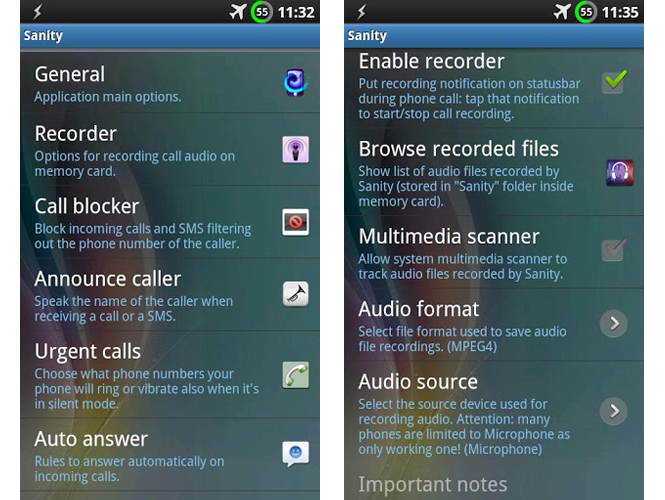
Sanity makes your phone calls better, easier and healthy. It is your personal assistant to:
– audio record your phone calls in mpeg4, 3gpp or amr format (also automatically)
– announce caller and SMS: speak the caller’s name when receiving a call or a message using the synthesised voice (text to speech)
– block unwanted calls and SMS: automatically refuse incoming calls and SMS filtering out the phone number (include or exclude anonymous and/or unknown numbers, favourites, contacts and groups; enable the block by choosing date and time); advanced: choose between different block methods to confuse the caller!
– auto answer: automatically answer the call when phone is ringing by choosing phone numbers, date and time and if respond only when using headphones.
– urgent calls: choose what phone numbers your phone will ring or vibrate also when it’s in silent mode
– automatic speakerphone: automatically turn on/off the handsfree when the phone is far/close to your ear
– outgoing anonymous calls: make private calls by hiding your caller ID (also automatically by filtering the phone numbers to call)
– reduce electromagnetic waves: automatically turn on/off wifi, bluetooth, GPS and mobile data (2G/3G) when you speak at your phone
– choose different volume levels during calls: one for normal calling, loud handsfree, wired headsets volume and bluetooth headsets volume
– automatic bluetooth headsets: automatically enable bluetooth for a limited time when the call starts
– timeouts for restoring silent mode and airplane mode: just enable the silent/airplane mode (in any way) and Sanity will ask you how much time to stay in that mode
– vibrate the phone when the call begins and when the call ends.
– fast SMS: displays the received SMS allowing you to respond immediately.

Sanity uses proximity sensor for turning on/off automatically the antennas and the handsfree when the phone is close to your ear. In this way, Sanity can make your calls healthier by lowering the electromagnetic fields. It can be also useful while you’re driving car: through automatic handsfree, the headsets are no longer needed.

Most of Sanity features are configurable through the most advanced phone number filter: choose whether to activate a function for all numbers or for anonymous numbers, unknown numbers, contacts (all or some), favorite contacts, contact groups and also filter by prefix number. Sanity is light, small and very fast. Sanity is a free software, open source, released under GNU Public License version 3.

Thus, you might be fed up of random calls when you are at work in an important meeting, at home relaxing or in the loo. Sanity will prove to be the solution to an ‘unnecessary calls free’ living.

Source: Drippler

Monday, 10 November 2014

12 Android battery life tips and tricks

Batteries are growing bigger with every passing year, but we're not seeing a huge benefit because our Android devices are demanding more and more out of them. Battery life still tops the complaint charts for smartphone owners tired of the daily charging routine.
The first Android smartphone, the HTC Dream, had a 1,150mAh battery, but it also had a 3.2-inch display. The Samsung Galaxy S5 has a 2,800mAh battery and a 5.1-inch display. Average battery capacities have been climbing steadily since 2008, but screen sizes have been keeping pace.
No one really wants to be told that the most obvious route to increased battery life is to use your phone less or worse: turn off some of the features that enticed you to buy it in the first place. So we've pulled together a list of relatively painless tips to keep your Android going that little bit longer.


1 - Use Power Saving Mode


Most Android device manufacturers have added some form of power-saving mode. You can automatically hobble your phone's features or shut down specific apps when your battery dwindles below a predetermined level.
Stock Android only offers battery stats for now, but Android Lollipop has a battery saver option built in (which means most phones running Android 5 will too in the future). If you can't find a power saving option, check out an app likeJuice Defender.


2 - Automate Your Phone


You don't need your phone syncing away through the night, so why not introduce a bedtime routine that automatically silences it and kills your data and Wi-Fi connections? With apps like AutomateIt and Tasker you can also automatically turn things on and off based on triggers and rules you define.


3 - Uninstall or Disable Apps


Delve into Settings > Apps and flick over to the 'All' tab to find a complete list of your apps. Anything there that you don't use is a candidate for the uninstall pile. In their infinite wisdom, carriers and manufacturers sometimes block you from uninstalling their apps, but you usually have the option to disable them instead and it's worth doing.


4 - Hibernate of Freeze Apps


You may also consider installing Greenify to get a good look at what is running and automatically hibernate apps that you aren't using, so they aren't eating system resources unless you start them up.
You'll need to root your device to really take full advantage, which is simple enough but will take a little time to manage if you're new to the process. If you do decide to root then you may also consider Titanium Backup Pro for freezing unwanted apps.


5 - Streamline your Homescreen


The busier your home screen, the more battery life it's going to suck. Get rid of widgets that you don't need, and consider reducing refresh rates. Animation costs power, so ditch the live wallpapers.
If you have a phone with an AMOLED display (such as nearly all of the high end Samsungs or the new Moto X), then use a dark background for the home screen and a dark theme in general. The technology achieves deep blacks by not lighting up those pixels and so dark backgrounds can save you some power.


6 - Tweak Display Settings


Your screen brightness is going to have a big impact on your battery. Don't rely on auto-brightness because it will generally be set higher than you really need. Reduce brightness manually and keep it as low as is comfortable. You can always pull down the notification shade and tweak it quickly via the quick settings when you have to.
You should also reduce the screen time out in display settings under sleep. The faster your Android device fades to black when not in use, the more power you'll save.


8 - Turn Off Vibrations


Some vibrations aren't good; when it comes to your Android phone or tablet they can be an unnecessary battery killer.
Start with haptic feedback for key presses. You'll usually find the option to turn 'Vibrate on keypress' off in Settings > Language & input in the options for the keyboard you are using. You could also turn off 'Sound on keypress' for extra saving.
You can also go into Settings > Sound and turn off 'Vibrate when ringing'. You'll find a Vibrate option that you can turn off in your SMS app settings as well.


9 - Turn Off Notifications


Do you need to know every time someone likes a post or comments on something you've engaged with on Facebook? Do you want to hear about the latest special offer or new app in your notification shade?
When you install any app, it automatically gains the right to fire notifications at you, but you can stop it in Settings > Apps by tapping on the app and clearing the 'Show notifications' box.


10 - Reduce or Stop Auto-syncing


Do you need to check for emails every five minutes? Reduce the frequency of your syncing and use push settings for email wherever possible.
For non-essential apps and services you could just stop background syncing altogether and tell them to only refresh when you actually start the app up. This is usually done through the settings in the app itself.


11 - Location Services


Go to Settings > Location and you can see which services and apps are trying to track you. Switch the mode to lower accuracy or just turn it off and you can save a lot of power.


12 - Underclocking the CPU


If you're willing to root then you can sweep away bloatware and get an optimized custom ROM, you can even download an app like SetCPU for Root Users and tell your processor to run at a slower speed in order to use less power. It's an extreme step, but it definitely has an impact.