It is all about the smart phone today. You might or might not have food to eat but you definitely have a smart phone, and why should you not? A smartphone is increasingly becoming the solution to every problem. The survival skills classes have been modified in schools and camps to incorporate a smart phone in the list of essential things, including water and food. And the stronger internet connection you have, the better.
Internet is the fuel that enhances the smartness of a smart phone, without which it is not that smart. This is because apps make a smart phone smart. And most of the apps that connect us to the world run on the internet. This keeps us well connected all the time.
However, connection with the world sometimes tends to become stronger that we would want it to be. This is because of the mighty web crawlers. Through the internet, these web crawlers keep such a strong tab on our online activity to understand our general behaviour and our preferences, mostly to annoy us with silly marketing calls that the internet becomes quite a nuisance for us. But like everything, the internet comes with its own set of good and bad.
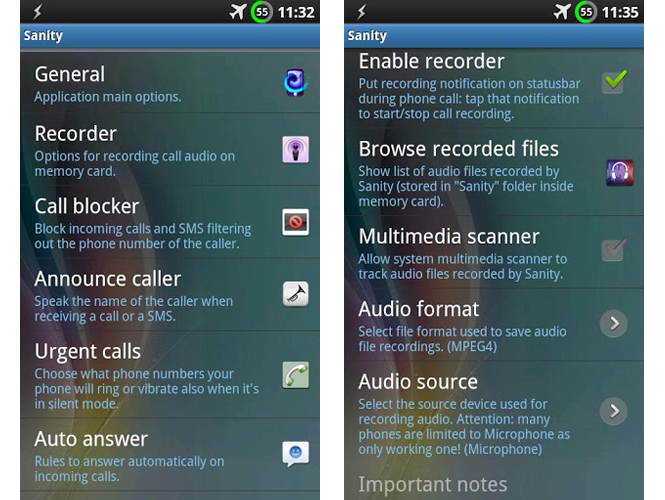
Fortunately, like poison, the internet is its own cure. So, to combat this particular problem what we need is sanity which can be achieved by an app called Sanity – to keep you from going insane.
Sanity makes your phone calls better, easier and healthy. It is your personal assistant to:
– audio record your phone calls in mpeg4, 3gpp or amr format (also automatically)
– announce caller and SMS: speak the caller’s name when receiving a call or a message using the synthesised voice (text to speech)
– block unwanted calls and SMS: automatically refuse incoming calls and SMS filtering out the phone number (include or exclude anonymous and/or unknown numbers, favourites, contacts and groups; enable the block by choosing date and time); advanced: choose between different block methods to confuse the caller!
– auto answer: automatically answer the call when phone is ringing by choosing phone numbers, date and time and if respond only when using headphones.
– urgent calls: choose what phone numbers your phone will ring or vibrate also when it’s in silent mode
– automatic speakerphone: automatically turn on/off the handsfree when the phone is far/close to your ear
– outgoing anonymous calls: make private calls by hiding your caller ID (also automatically by filtering the phone numbers to call)
– reduce electromagnetic waves: automatically turn on/off wifi, bluetooth, GPS and mobile data (2G/3G) when you speak at your phone
– choose different volume levels during calls: one for normal calling, loud handsfree, wired headsets volume and bluetooth headsets volume
– automatic bluetooth headsets: automatically enable bluetooth for a limited time when the call starts
– timeouts for restoring silent mode and airplane mode: just enable the silent/airplane mode (in any way) and Sanity will ask you how much time to stay in that mode
– vibrate the phone when the call begins and when the call ends.
– fast SMS: displays the received SMS allowing you to respond immediately.
Sanity uses proximity sensor for turning on/off automatically the antennas and the handsfree when the phone is close to your ear. In this way, Sanity can make your calls healthier by lowering the electromagnetic fields. It can be also useful while you’re driving car: through automatic handsfree, the headsets are no longer needed.
Most of Sanity features are configurable through the most advanced phone number filter: choose whether to activate a function for all numbers or for anonymous numbers, unknown numbers, contacts (all or some), favorite contacts, contact groups and also filter by prefix number. Sanity is light, small and very fast. Sanity is a free software, open source, released under GNU Public License version 3.
Thus, you might be fed up of random calls when you are at work in an important meeting, at home relaxing or in the loo. Sanity will prove to be the solution to an ‘unnecessary calls free’ living.
Source: Drippler
Source: Drippler

